For the complete documentation index, see llms.txt. This page is also available as Markdown.

Platform Metrics

Platform Metrics surfaces each connected ad platform's own reported conversion value, ad spend, and ROAS directly from its API, alongside GA4.

What is Platform Metrics?

Platform Metrics surfaces each connected ad platform's own reported metrics, conversion value, ad spend, and ROAS, directly from that platform's API. It replicates the same three variables across Facebook, Google, Pinterest, Snapchat, TikTok, and also pulls engagement data from Google Analytics 4. It is built for media buyers who want to see platform native numbers without logging into each ad platform separately, and for merchants who want to compare a platform's self reported ROAS against Bloom's own blended MER and aMER metrics.

How it Works

The components map channel specific telemetry variables directly from the layout framework, replicated across each native ad platform integration. Each platform (Facebook, Google, Pinterest, Snapchat, TikTok) reports its own Conversion Value, ROAS (API), and Ad Spend, exactly as that platform's API returns it. GA4 contributes a separate set of traffic and engagement metrics from the Google Analytics 4 API.

How ROAS (API) is Calculated

For every ad platform, ROAS (API) is that platform's Conversion Value divided by its Ad Spend, as returned by the platform's own API. Bloom does not recalculate it; the number is the platform's self-reported figure.

Data Available

Facebook Metrics

Metric

Description

Facebook Conversion Value

The total monetary value generated from conversions attributed to the Facebook ads. Helps in evaluating the effectiveness of advertising campaigns in terms of the actual revenue they bring to the business.

Facebook ROAS (API)

It measures the revenue generated for every dollar spent on Facebook advertising. It helps in optimizing the advertising budget and evaluating the effectiveness of the campaigns. Facebook Conversion Value / Facebook Ad Spend.

Facebook Ad Spend

It refers to the total amount of money allocated to advertising on the Facebook platform, including ads shown on Facebook to reach targeted audiences and achieve specific marketing objectives.

Facebook Metrics in Bloom

Google Metrics

Metric

Description

Google Conversion Value

This refers to the total monetary value generated from conversions resulting from the Google Ads campaigns.

Google ROAS (API)

It is used to evaluate the effectiveness of your advertising campaigns in generating revenue relative to the amount spent on ads. Google Conversion Value / Google Ad Spend.

Google Ad Spend

Track ad cost and spend from each Google ad campaign and other ad metrics.

Google Metrics in Bloom

Pinterest Metrics

Metric

Description

Pinterest Conversion Value

Total revenue generated from conversions attributed to Pinterest advertising or organic activity. Helps store owners understand the monetary impact of their Pinterest efforts, whether from paid campaigns or organic reach.

Pinterest ROAS (API)

It refers to the use of Pinterest's API to calculate and track the Return on Ad Spend (ROAS) from Pinterest ad campaigns. Pinterest Conversion Value / Pinterest Ad Spend.

Pinterest Ad Spend

It refers to the total amount of money spent on running paid advertising campaigns on Pinterest.

Pinterest Metrics in Bloom

Snapchat Metrics

Metric

Description

Snapchat Conversion Value

Refers to the total monetary value generated from conversions resulting from your Snapchat advertising campaigns.

Snapchat ROAS (API)

It measures the revenue generated from Snapchat advertising campaigns relative to the ad spend, specifically accessed through Snapchat's API (Application Programming Interface). Snapchat Conversion Value / Snapchat Ad Spend.

Snapchat Ad Spend

The total amount of money spent on advertising campaigns run through Snapchat that aim to drive traffic and sales to the Shopify store.

Snapchat Metrics in Bloom

TikTok Metrics

Metric

Description

TikTok Conversion Value

The total revenue generated from users who completed a desired action after interacting with your TikTok ads. It helps in understanding the financial impact of advertising efforts and in assessing the overall effectiveness in driving sales.

TikTok ROAS (API)

It refers to the metric that calculates the revenue generated for every dollar spent on TikTok advertising, specifically when using the TikTok Ads API to retrieve performance data. Tiktok Conversion Value / Tiktok Ad Spend.

TikTok Ad Spend

It refers to the total amount of money invested in advertising campaigns on the TikTok platform. It helps to assess the effectiveness of marketing strategies and determine the return on investment (ROI) from TikTok ads.

TikTok Metrics in Bloom

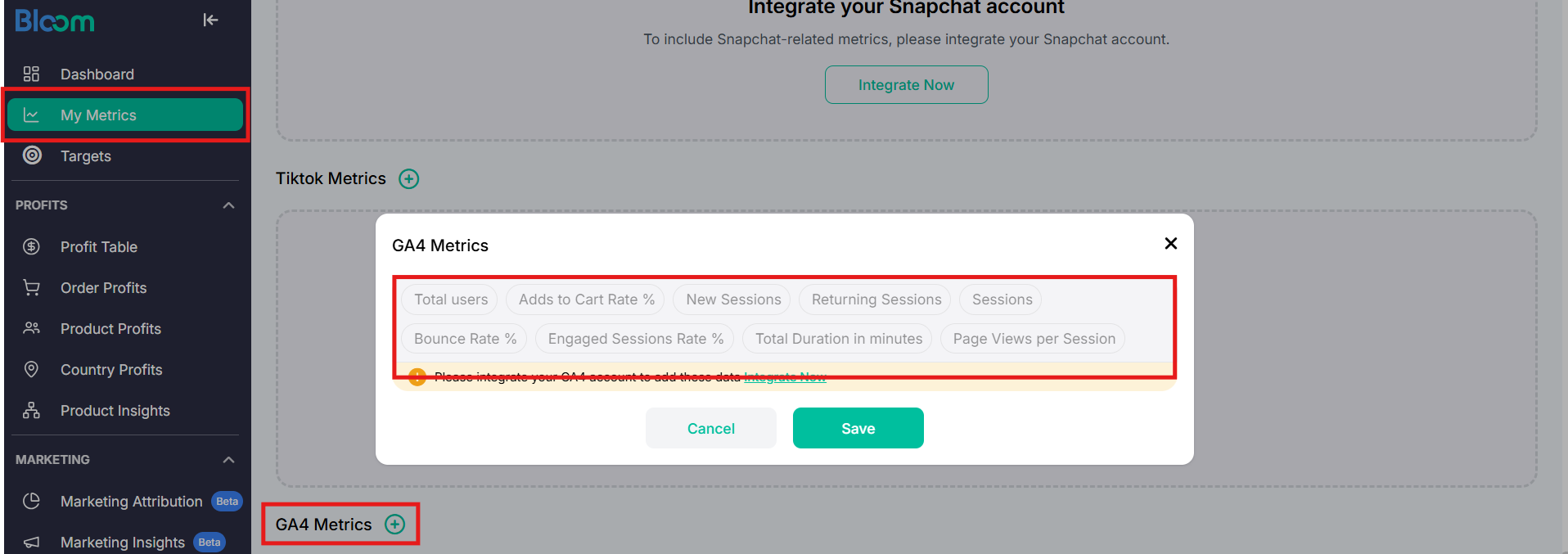
GA4 Metrics

Metric

Description

Total Users

The total number of people who visited your site or app in the specified date range.

New Sessions

A session is a group of user interactions with your website or app that take place within a given time frame.

Returning Sessions

The number of people who have visited your site or app before in the specified date range.

Sessions

In Analytics, a session initiates when a user either opens your app in the foreground or views a page or screen and no session is currently active, for example, their previous session has timed out.

Bounce Rate %

The percentage of sessions that were not engaged.

Engaged Sessions Rate %

The percentage of engaged sessions on your website or mobile app.

Total Duration in minutes

Total Duration (often expressed as Average Session Duration) is the total amount of time (in seconds or minutes) users spend on your site or app.

Page Views per Session

In Google Analytics 4 (GA4), Views per Session is the average number of web pages or app screens a user views during a single visit.

Adds to Cart Rate %

The Add-to-Cart Rate in Google Analytics 4 (GA4) represents the percentage of users or item views that lead to an item being added to the shopping cart.

GA4 Metrics in Bloom

How to Use it

  1. Open a channel's Platform Metrics view to see its self-reported ROAS (API).

  2. Cross-reference that number against the blended MER shown in Marketing Metrics to see whether the channel's strong platform-reported number holds up once all channels and margin are factored in.

Last updated

Was this helpful?