> For the complete documentation index, see [llms.txt](https://docs.bloomanalytics.io/llms.txt). Markdown versions of documentation pages are available by appending `.md` to page URLs; this page is available as [Markdown](https://docs.bloomanalytics.io/profit/product-insights/product-ads.md).
# Product Ads
Product Ads gives you a product-level view of Shopify advertising performance, so you can spot profitable ads, budget drains, and hidden opportunities.
### What are Product Ads?
Product Ads helps you understand how advertising is impacting your products. Instead of looking at campaign-level metrics alone, it provides a product-focused view of your advertising performance, making it easier to see where your marketing efforts are creating value and where opportunities for improvement may exist.
By bringing product and advertising data together, Product Ads helps you evaluate the effectiveness of your advertising strategy at a more meaningful level, so you can make more informed decisions about where to invest, optimize, or reassess your advertising efforts.
### How it Works
Each product is automatically assigned to a category based on its advertising performance. These categories are designed to help you quickly understand how advertising is contributing to the success of your products, using thresholds you configure in Ad Settings.
**Profit Maker**
Products that are performing strongly from an advertising perspective. Often among the most successful at turning advertising efforts into business results, and may represent opportunities for further growth and investment.
**Margin Trap**
Products that may appear to be performing well at first glance but could benefit from closer review. Highlight opportunities to better understand the relationship between advertising performance and overall business outcomes.
**Budget Drain**
Products that may require optimisation or reassessment. Indicate areas where advertising performance could be improved, and reviewing them can help allocate resources more effectively.
**Money Pit**
Products that require additional investigation before further investment. May benefit from a review of advertising strategy, creative assets, targeting, or overall product positioning.
**Hidden Gem**
Products that show strong potential but may not currently receive significant advertising attention. Can represent valuable growth opportunities and may benefit from increased visibility.
**Dead Weight**
Products that currently contribute limited value from an advertising perspective. Worth reviewing to determine whether changes can improve performance or whether resources could be allocated elsewhere.
**How products are classified**
Bloom classifies each product using thresholds you set in Ad Settings: a Target ROAS that defines effective advertising performance, and a Hidden Gem Margin Floor that ensures Hidden Gem candidates are both profitable and have strong advertising potential. See "How to use it" below to configure these thresholds.
### Data Available
The Product Ads dashboard provides several tools to help you better understand advertising outcomes across your product catalogue.
**Insights**
Product Ads includes Intel, prioritised to help you focus on the actions most likely to have an impact.
| Priority | What it flags |
| -------- | ----------------------------------------------------------------------------------------------- |
| Critical | Products or trends that may require immediate review. |
| High | Important opportunities or risks that should be evaluated soon. |
| Low | Additional observations and optimisation opportunities that may support long-term improvements. |
**Summary cards**
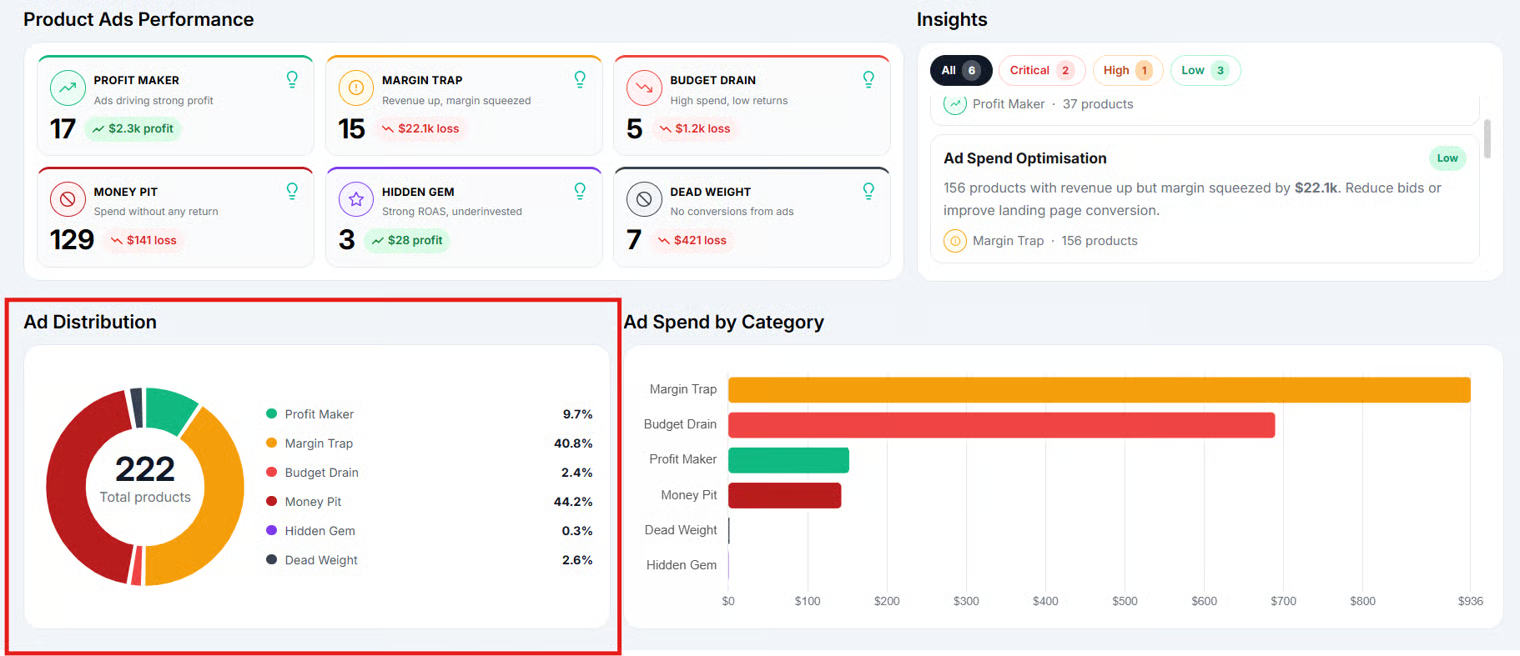
A quick overview of how products are distributed across advertising categories, so you can immediately understand the overall health and composition of your advertising efforts.
**Ad Distribution**
A visual breakdown of products across categories, making it easy to identify patterns and trends within your advertising performance.
**Ad Spend by Category**
Shows how advertising activity is distributed across different groups of products, providing additional context when evaluating performance and identifying opportunities.
**Ad Spend vs Contribution Margin**
A bubble chart comparing advertising spend against contribution margin for individual products. Helps you evaluate whether advertising investment is generating meaningful business outcomes and identify products that may require optimisation.
| Axis | What it shows |
| --------------- | ------------------- |
| Horizontal axis | Ad Spend |
| Vertical axis | Contribution Margin |
| Bubble size | Units Sold |
**Category Visibility Controls**
Filters that let you include or exclude specific advertising categories from visualisations, so you can focus on the product groups most relevant to your analysis.
**Hide Outliers**
A toggle that temporarily removes unusually large or small values from visualisations, improving chart readability and making overall advertising performance trends easier to identify.
**Product Ads Table**
A detailed view of individual products and their advertising-related metrics. Search for specific products, apply filters, compare performance, and explore data in greater detail.
### How to Use it
1\. Open Product Ads from Product Insights.
2\. Configure Ad Settings to align with your advertising strategy:
\- Target ROAS: set the minimum Return on Ad Spend required for a product to meet your advertising goals. Products that meet or exceed this threshold are considered to be performing effectively.
\- Hidden Gem Margin Floor: set the minimum gross margin required for a product to qualify as a Hidden Gem, ensuring candidates are both profitable and have strong advertising potential.
3\. Review the Intel panel first, starting with Critical, then High, then Low priority items.
4\. Use the summary cards and Ad Distribution chart to check the overall makeup of your advertising performance.
5\. Explore Ad Spend by Category and Ad Spend vs Contribution Margin to spot patterns. Use Category Visibility Controls to focus on specific groups, and toggle Hide Outliers if extreme values are distorting the view.
6\. Open the Product Ads Table to inspect individual products. Search, filter, and sort to focus on the categories or metrics most relevant to you.


.png?alt=media&token=dd517952-e334-4ff0-a7ef-40575fe847de)